Open Source · Self-Hostable · End-to-End Encrypted

Your Notes.
Private by Design.

A powerful, self-hostable note-taking app with end-to-end encryption. Run it on your Raspberry Pi, your home server, or anywhere Node.js runs — your data never leaves your control.

View on GitHub Self-Host in 5 Minutes
E2E
Encrypted
0
Cloud Dependencies
SQLite
Default Database
Pi-Ready
Raspberry Pi Support
https://mynotes.192.168.1.10.nip.io
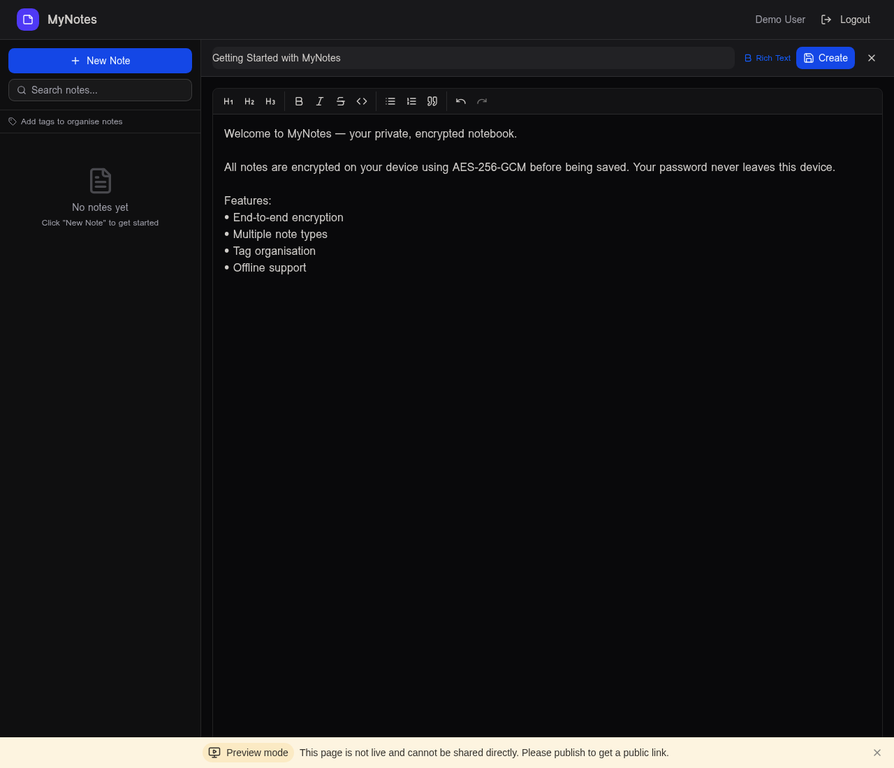
MyNotes dashboard showing the rich text editor with a note open, sidebar with note list, and formatting toolbar

Everything you need.
Nothing you don't.

Built for privacy-conscious users who want full control over their data.

End-to-End Encryption
Notes are encrypted on your device using AES-256-GCM via the Web Crypto API before being stored. The server never sees plaintext — not even the database admin.
Rich Note Editor
Write in plain text, rich text, or Markdown. Full formatting toolbar with bold, italic, headings, lists, code blocks, and inline code support.
Tags & Colour Coding
Organise notes with colour-coded tags. Create tags with a 10-colour picker, assign multiple tags per note, and filter the sidebar by tag instantly.
Folders & Nesting
Group notes into folders and subfolders. Move notes between folders with drag-and-drop. Keep work, personal, and project notes cleanly separated.
Auto-Save & Revision History
Notes are saved automatically every 30 seconds while you type. Every save creates a revision — browse the full history and restore any previous version.
Full-Text Search
Search across all your notes instantly. Results highlight matching text and show a preview snippet so you can find anything in seconds.
Local Authentication
Register and log in with a username and password — no Manus account, no third-party OAuth required. Password reset via email (optional AgentMail integration).
Admin Dashboard
Role-based access control with admin and user roles. Promote users to admin directly from the database. All admin-only procedures are server-side gated.
SQLite or MySQL
SQLite is the default — zero config, single file, perfect for Raspberry Pi. Switch to MySQL/TiDB for multi-user or high-availability deployments with one env variable.
Zero-knowledge.
Zero compromise.

Encryption happens entirely in your browser. The server stores only ciphertext — it cannot read your notes even if the database is compromised.

AES-256-GCM encryption
Industry-standard authenticated encryption using the native Web Crypto API — no third-party libraries.
PBKDF2 key derivation
Your password is never sent to the server. A 256-bit encryption key is derived client-side using PBKDF2 with 100,000 iterations.
bcrypt password hashing
Login passwords are hashed with bcrypt (cost factor 12) before storage. Even a database breach exposes no usable credentials.
HTTPS everywhere
Caddy reverse proxy with automatic TLS (self-signed or Let's Encrypt). Web Crypto API requires HTTPS — enforced by the setup script.
Encryption Flow
Your note
Meeting at 3pm — discuss Q3 budget...
↓ AES-256-GCM + PBKDF2 key ↓
Stored
U2FsdGVkX1+mK9x7Qz3nR8vYpL2wX...
The server receives and stores only the encrypted blob. Decryption happens entirely in your browser using your password-derived key — the server key is never involved.

Run it on your Pi.
Own your data.

One script installs everything: Node.js, Caddy, systemd services, and HTTPS. No Docker required.

1
Install Docker or use native install
Docker Compose or a single bash script — both options are included. The native install uses Caddy + systemd for a lightweight footprint on the Pi.
2
Run setup-local.sh
One command installs Node 20, pnpm, Caddy, builds the app, and registers two systemd services that start on boot.
3
Automatic HTTPS via nip.io
Caddy issues a self-signed certificate for mynotes.<IP>.nip.io — no port forwarding, no domain purchase needed.
4
Update with one command
git pull && pnpm build && sudo systemctl restart mynotes — or re-run setup-local.sh to apply any infrastructure changes.
# Clone the repo git clone https://github.com/nzicecool/mynotes.git cd mynotes/deploy # One-command install (SQLite default) sudo bash setup-local.sh # Optional: MySQL instead of SQLite sudo bash setup-local.sh --db=mysql # Check service status sudo systemctl status mynotes sudo systemctl status caddy-mynotes # View live logs journalctl -u mynotes -f # Update to latest version git pull && pnpm build sudo systemctl restart mynotes
Full Setup Guide → Star on GitHub

Built on solid foundations.

React 19 Tailwind CSS 4 TypeScript tRPC 11 Express 4 Drizzle ORM SQLite / MySQL Web Crypto API Caddy HTTPS Vite 7 Vitest shadcn/ui

Ready to own your notes?

Open source, self-hostable, and private by design. Get started in minutes.

View on GitHub Setup Guide →